New features: What's new in Gold V8
New features: What was new in version 7
New features: What was new in version 6
New features: What was new in version 5
What's New in Solar Fire GOLD V8
Upgrading from version 7 to version 8:
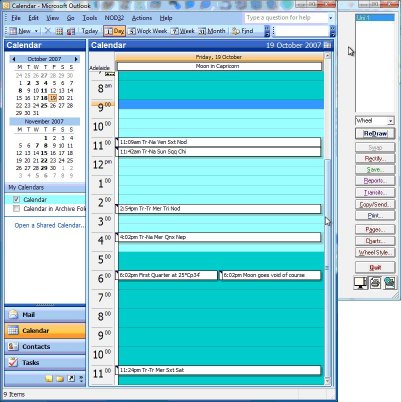
Appointments Manager Our exciting newest feature is a built-in
system for managing your clients’ appointments, sessions and details.
Our Appointments Manager enables you to make a session time in the
Solar Fire calendar, email appointment reminders and record the session
as a .wav file (audio file) to send to your client later. You can time
your sessions and set a rate of pay that enables you to generate and
then send a receipt to clients afterwards. You can also manage all your
clients’ details and send group emails.
50 User-Defined Points Now you can add
up to 50 astrological points to the main Solar Fire wheel! Over the
years, many of you have asked whether or not you could add asteroids,
fixed stars, Arabic parts, midpoints and various other points onto the
main wheel of Solar Fire, instead of using the Extra Ring. In response
to these requests, a new feature in this latest major update now allows
for up to 50 user-defined points to appear on the main wheel along with
Sun, Moon, Mercury, and so on. Now you can add up to 50 points
from your list of Extra Points. You can add points to existing
Displayed Points files or create your own favorite selection.
Asteroid Glyphs Solar Fire Gold v8 now
has 65 asteroid glyphs for display on your Chart. These beautifully
designed glyphs have been supplied by Asteroid expert Roderick Kidston
in Australia. Some of the glyphs are in common usage and where there
were no glyphs for some asteroids, Solar Fire uses Roderick’s glyphs.
You can select various Asteroids and their glyphs for display in
your Chart Wheel or you can select all 65 asteroids that have glyphs
within the Extra Ring. The 65 asteroids are: Abundantia, Aditi,
Adonis, Adorea, Amor, Amphitrite, Anubis, Apollo, Arachne, Aten,
Atlantis, Atropos, Bacchus, Cupido, Diana, Eros, Europa, Fama, Flora,
Fortuna, Frigga, Gaea, Ganesa, Ganymed, Gilgamesh, Gilgame, Gratia,
Harmonia, Harmoni, Hathor, Haumea, Hebe, Hekate, Hephaistos, Hephais,
Herculina, Herculi, Hidalgo, Horus, Icarus, Imhotep, Iris, Isis,
Jubilatrix, Jubilat, Kleopatra, Kleopat, Klotho, Lachesis, Lachesi,
Lilith, MakeMake, Midas, Moira, Neith, Nephthys, Ops.
Ashtkoot Compatibility System The
Ashtkoot Compatibility System is a system that has its roots in India
and is primarily used in Vedic astrology. Vedic and Relationship
Astrologers will love this simple calculation that compares two
people’s charts and comes up with a compatibility score. Anything over
18 is a green light. Try your charts and see how you go. As Solar
Fire’s own Neville Lang explains: “Ashtkoot” simply means “8 factor”.
The scoring within this system is based on the position of the sidereal
Moon (Lahiri) of the two people and the 8 factors are scored on the
integration of these two Moon positions. The maximum score is 36. The
implementation of this system in Solar Fire Gold v8 allows a user to
select two charts from either the chart files or ones that have been
entered and if a zodiac used in those charts is one other than the
Lahiri zodiac then Solar Fire Gold v8 automatically converts the Moon
position to the Lahiri (sidereal) position internally and the scores are then
calculated. Neville Lang has studied about 100 couples over a 10 year
period (still a small sample size) using the Ashtkoot Compatibility
system and he has come up with some tentative boundaries of the Total
score. If you think about using traffic lights as a quick indicator
then the Red light will represent scores of 40% of the maximum 36 (a
score of 14.4) and lower, the Orange light will represent the range
from 40% (14.5) to 69% (24.7), and the Green light will represent
scores of 24.8 and higher. Basically, the Red light indicates a warning
for the long term viability of the relationship, the Orange light means
that is it “middling” and requires more analysis of the two individual
charts while the Green light indicates a high degree of compatibility
for the relationship to run for the long term.
Solar Maps v4 In recent times you have been
able to access Solar Maps Lite with your Solar Fire. Now you can access
the full Solar Maps which has been included for your enjoyment and
astrological work. All of the features of Solar Maps v3 have been
included in Solar Fire including the Relocation reports, the Zoom
facility and more….
Teacher/Student feature Teachers – you can now send your preferred Solar Fire settings to your students! Students – you can now receive your teacher’s Solar Fire settings as a single
file. No more fiddling around! Yes, in an effort to assist astrology
teachers and students with setting up Solar Fire for students, we have
now provided a new feature that enables a teacher to scan Solar Fire
for the current settings used for teaching and to create a single *.zip
file. The ZIP can either be sent directly to any student who already
has Solar Fire Gold v8, or the ZIP file can be sent to Esoteric
Technologies where it can be placed on a new Teacher webpage located at
www.esotech.com.au on the “Resources” side menu. Students from
anywhere in the world taught by that teacher can then simply download
the ZIP file and have their Solar Fire Gold v8 automatically updated
with the teacher’s settings. At any point in time, a student can easily
switch from the teacher’s settings back to their regular settings and
then back to the teacher’s settings.
Vertex Interpretations Up until this
version of Solar Fire, there were no natal interpretations for the
Vertex. Text for the Vertex has been kindly supplied by Alice Portman,
an Australian astrologer and expert on this subject. The Solar Fire
interpretations text is continually updated and improved for your
enjoyment. You can find all types of information by clicking on the
Chart’s Displayed Points or producing a report in your Word
Processor. These reports can be sold or given to your friends,
family and clients however we recommend you edit them first as they
have been written for astrological edification. For fully comprehensive
reports for more general use please see our Solar Writer range which
can be used seamlessly with Solar Fire or on their own.
New Traditional Wheel Designs Now you can view Face rulers, Terms rulers, Egyptian rulers and Nakshatras on your Solar Fire Chart wheel! The
previous version of Solar Fire Gold supplied a wheel style displaying
decanate rulers. This version now extends this concept to include
wheels displaying rulers used in Classical astrology. To display the
decanate ruler wheel, on the “View Chart” screen you can simply select
the DecRuler.wh1 wheel style from the “Wheel Style” button. Now
you can choose either of the following:
- Face rulers
- Ptolemy Term rulers
- Egyptian rulers
- Nakshatras
New for Financial astrologers Financial astrologers are likely to appreciate the
inclusion of two new Dial styles – 24 and 120 degree dials which can be
used in harmonic trading work plus the new Commodities Arabic Parts
file.
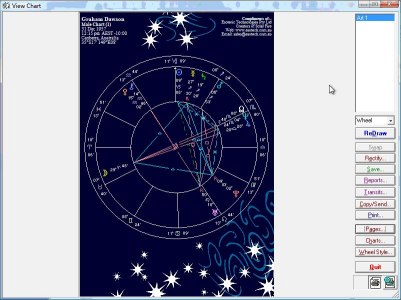
New Chart Art Solar Fire Gold v8 now
has a wide range of new Chart Art designs including starry skies, art
work by contributing artists and twelve beautiful black and white
Renaissance depictions of the signs. Family, friends and clients love
these beautiful depictions of their charts.
Our exciting enhancements are often simple but oh so appreciated
ACS Atlas – Each
version of Solar Fire is updated with the latest Time Zone and Place
information made available in the ACS Atlas. Solar Fire Gold v8 now has
these latest changes. You can also edit your ACS Atlas information to
update yourself whenever a country changes its Time Zones.
Astrology Schools item on the Help menu Solar
Fire Gold v8 now assists a user by providing a direct link to a webpage
on Esoteric Technologies’ website where a list of schools, the
principal(s) and a classification of what type of astrology the school
focuses on is displayed. At present, there are only a small
number of schools but in time this list will grow. Contact admin@esotech.com.au if you would like to be included.
An Alternative Glyph for Neptune An
alternative glyph for Neptune has been added to Solar Fire Gold v8. In
previous versions of Solar Fire, the glyph selection was on the “Misc”
tab in the Preferences. Now, a new tab called “Glyphs” has been added
to the set of tabs in the Preferences.
New Location button on the Animate screen Now
you have control over the location (and timezone) of the subsidiary
charts or transit charts in the Animate module. With the introduction
of the “Location” button, you now have full control over the location
and time zone of any of the charts in the Animate Module. As an
example, if you open a natal chart from a chart file, have it
highlighted in the Calculated Charts list then click on Dynamic >
Animate QuadriWheel, Solar Fire automatically calculates and displays
the Natal, the Secondary Progression, the Solar Arc and the current
Transit chart, all with the same natal location and time zone.
Composite Chart Art Solar Fire Gold v8 also
includes 12 new Chart Art pages that have been designed displaying key notes
for the house location of the composite Sun.
Dasas for Natal Charts Two new pages can now
be displayed showing the Dasas for a natal chart. A major dasa cycle
runs for 120 years and it is further sub-divided into sub-dasas also
known as bhuktis. If you open a natal chart and use a Vedic zodiac,
like Lahiri, you can now display the dasa periods for that natal chart.
Our treasure box of new little gems
Animate Charts You
asked for it and we have delivered! We have added an Animate Chart
button on the View Chart screen so now you can easily View your chart
and then click on Animate directly from the View Chart screen.
Animate Charts A
“Weeks” option has now been added to the Step By dropdown in the
Animate module You can now step an animate screen by a number of
weeks, with the addition of this new menu item.
Updated Aussie Database A new Australian
database has been supplied where a number of entries have been added
and changed. This chart file is called Aus2011.SFcht.
Microsoft 2010 Compatibility Solar Fire Gold v8 works with Word 2010 and Outlook 2010
What's New in Solar Fire 7
Upgrading from version 6 to version 7:
-
Expanded interpretations for natal, progressed and transiting charts -- plus added sign/house interps for Sedna, Eris, Selena and the Black Moon Lilith.
-
Traditional hot/cold/wet/dry tallies for temperament (sanguine, choleric, melancholic or phlegmatic) according to William Lilly.
-
New gemstone chart art.
-
Lynda Hill's in-depth Sabian symbols interpretations -- both as an oracle and as a report on points in the chart.
Solar Fire Gold works with the same logic and consistency as the previous version, so there's virtually no learning curve. But it also contains many useful additions and improvements:
- More chart points including Eris and Sedna
- Beautiful daily, weekly or monthly calendar pages
- Enhanced dynamic hit lists features
- Built in Astrological Encyclopedia
- New firdaria reports
- Improved chart and time searches
- New and more easily available tables and graphics
- Gorgeous new graphics include 20+ professionally designed decorative charts suitable for sale or gift-giving
Other new goodies include a pop-up birthday reminder . . . . . . 1000+ new timed, sourced, Rodden-rated and categorized celebrity charts . . . instant switching between Mean/True nodes and Tropical/Sidereal zodiacs . . . the ability to select a different chart without leaving the chart view screen or info listing . . . a full ACS Atlas that you now can add to . . . and enhanced Vista compatibility.
What's New in Solar Fire 6
Upgrading from version 5 to version 6:
- Solar Fire 6’s new Chart-File Search gives you a powerful and quick way to locate all charts in a given category. It can search through hundreds or even thousands of charts and pull out charts with virtually any kind or combination of astrological signatures. These range from a simple planet, asteroid, hypothetical body or house cusp in a given sign on up to any of 25 multi-planet aspect patterns (t-squares, grand trines, yods, heles, rosettas Thor’s Hammers, grand quintiles and more). You can search for two points in a given phase relationship, a point that is in aspect to any specified zodiacal position, or a point at, above or below a given longitude, latitude, right ascension, declination, azimuth, altitude or speed. In addition, the Chart Search offers a rich selection of classical criteria -- 7 types of horary consideration; any point that has a given dignity, ruler or almuten; or the ruler, almuten, antiscion or contra-antiscion of a point being a specified planet or having a specified dignity.You can also search for any word or character string in the chart comments, making it possible to see whether people who have similar life themes have similar charts. Or you can look for astro twins by searching for similar birth dates, times and Ascendants. Or search on “days to birthday” to find clients who are soon due for a solar return reading. Besides searching for hundreds of single criteria, you can use “And/Or/Not” connectors to combine any number of criteria, and you can save these complex criteria files for future use. By enabling you to see how astrological principles actually work out in practice, Solar Fire 6’s new Chart Search is guaranteed to broaden and solidify your astrological knowledge.
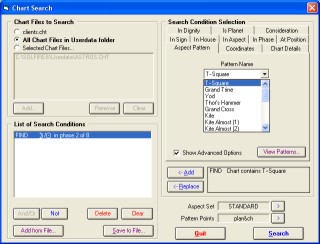
Solar Fire 6 - New Chart Search Dialog Box
- New Electional or Time Search lets you specify criteria similar to those in the Chart Search. Solar Fire 6 then lists all time periods when these criteria are in force. This helps you find the optimum time window for starting a project. It also makes it easy to find all periods in history that have a specific combination of astrological conditions.
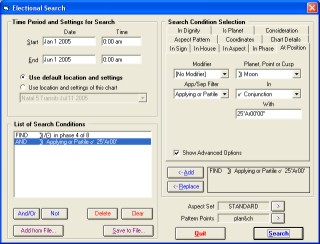
Solar Fire 6 - New Time Search Dialog Box
- New aspect highlighting is an enormous help in making sense of the aspect lines in the center of the wheel. Earlier Solar Fire versions enabled you to color-code aspects. Now you can also specify increasingly wide lines as an aspect approaches exactness, and dotted lines when an aspect separates. In a natal chart, this makes the most important aspects really stand out. In the animated chart, it dramatizes each aspect’s build-up, perfection and separation as the planets move forward in time.
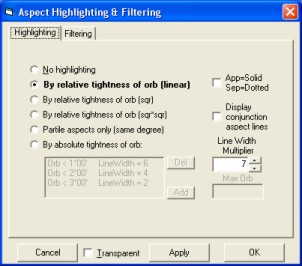
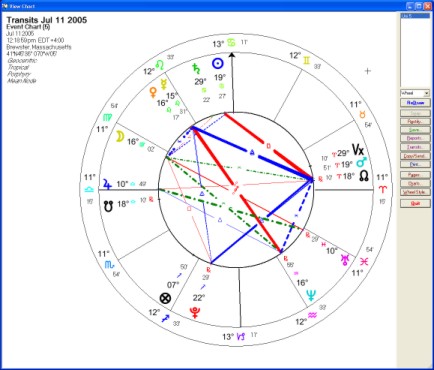
SF 6 - New Aspect Highlighting Feature
- New aspect filtering lets you temporarily cut out the kinds of aspects that you’re not looking for so that the patterns that you are looking for stand out clearly. You can filter out all aspects beyond a certain orb, all separating aspects, all soft aspects, all aspects that don’t involve a specified planet or harmonic, etc. -- even all aspects that aren’t part of any of the 21 specific aspect patterns that Solar Fire 6 can recognize. Whether you’re viewing a chart wheel, aspect grid or animated chart, it’s very easy to turn the filter window on and off and to switch to from one filter to another as the need arises.
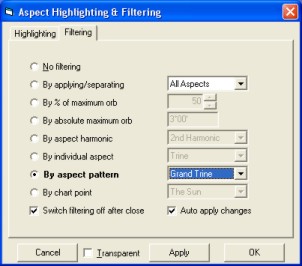
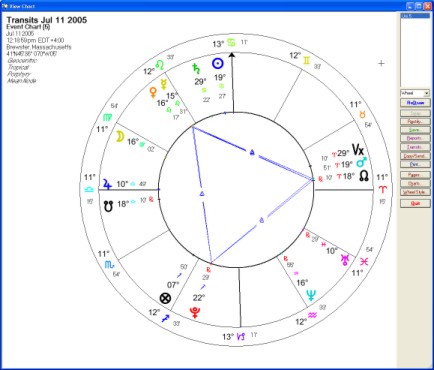
SF 6 - New Aspect Filtering Feature
- New life-event storage. Besides storing chart comments, you can now store unlimited life-event times, places and descriptions with any natal chart. Gives you a convenient place to store this info, and keeps it instantly ready for casting transiting, progressed and directed charts for life events without your ever having to re-enter the event data. Also, in the animated chart view, you can click on any event and jump right to its exact date and time.
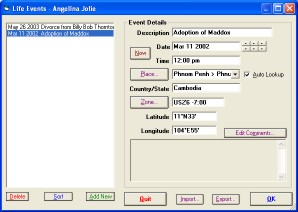
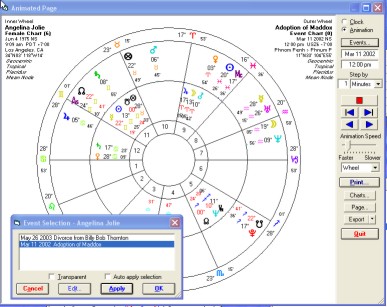
SF 6 - Life Events Feature
- New Vedic options -- a new detailed nakshatra table, 8 more ayanamsas ( making a total of 15, plus user-defined) and now 20 types of Vedic divisional or harmonic charts (harmonics 1 through 12, plus selected harmonics up to 60 and Iyer and regular types of 11th harmonic chart). All this plus the existing dasa/bhukti tables, Vedic unidirectional and sign-to-sign aspects, North and South Indian square charts, and Hindu Bhava and Whole Signs (rasi) houses gives you all you need to do basic Vedic. (Plus, as an added convenience, you can now instantly toggle between the sidereal and tropical versions of a chart.)
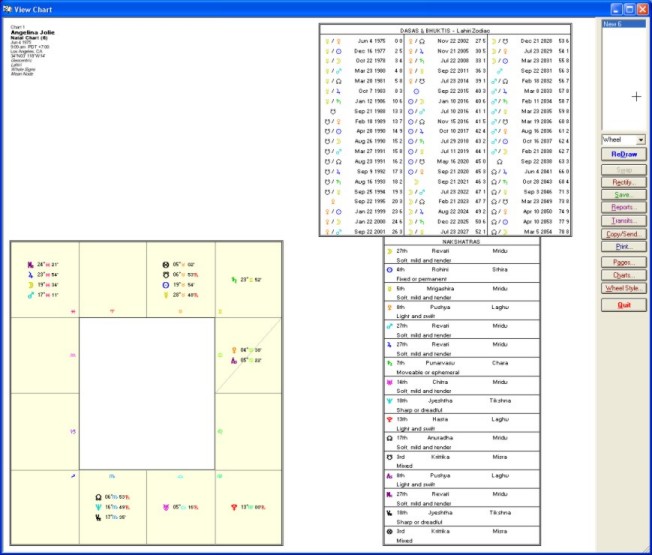
SF6 - Vedic Features with new Nakshatras table
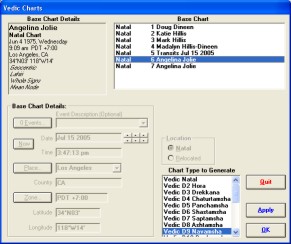
SF6 - New Vedic Chart Types
- New Chinese Charting. Detailed or short tables give the Chinese lunar mansion of each point in the chart. There’s also a Year Pillar table that is correctly calculated for each lunar-based Chinese year. This gives the birth year’s animal, Chinese element and yin/yang polarity.
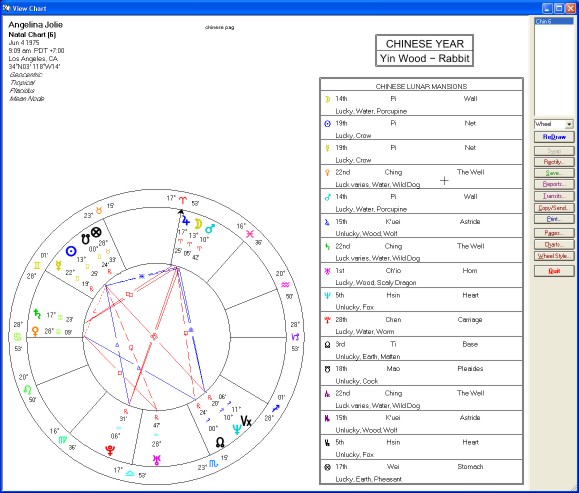
SF6 - New Chinese Features
- New Chart Preview makes it easier to find the chart that you’re looking for. When you click on a calculated chart or you select a chart in your files, Solar Fire 6 instantly displays the whole chart in a small but readable wheel design of your own choosing.
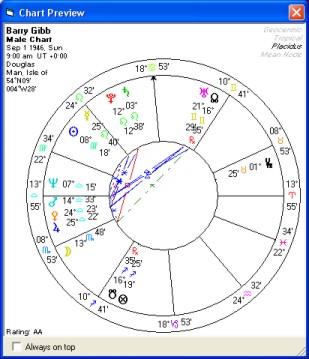
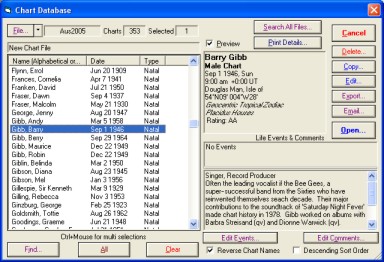
SF6 - New Chart Preview Screen
- New void-of-course Moon periods are now an option in Solar Fire’s powerful dynamic hitlists and Time Maps. It’s easy to print out a handy list for reference during the coming week, month or year. You can even mix Void periods in the same list with other considerations like retrograde periods, lunations, planetary ingresses and transiting aspects.
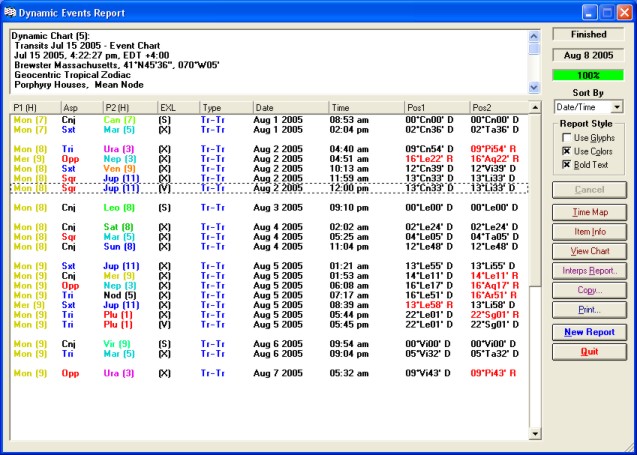
SF6 - Void of Course Moon Table
- New Age-Harmonic Charts are an innovative and potentially powerful technique to add to your forecasting repertory. Solar Fire 6 lets you instantly cast a harmonic chart based on a person’s exact age down to the day, hour and minute (or the age plus 1 year). You can then see transits to this chart in Solar Fire’s dynamic hitlists and graphs.
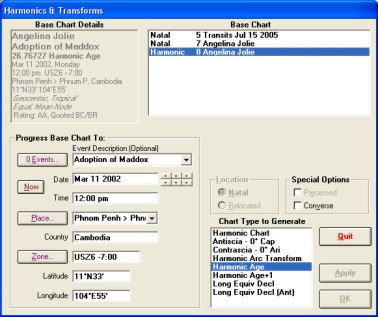
SF6 - Harmonic and Transform Charts Dialog Box
- New progressed interpretations by Stephanie Johnson have been added to the existing natal, transiting and synastry interpretations. By clicking on an item on the screen, you can instantly see its meaning. You can also view and print interpretation reports for a whole hitlist or chart.
- New whole-day Planetary Hour tables show all changes of planetary hours on any given day. (And of course, they’re correctly calculated for the latitude and longitude of the locality.)
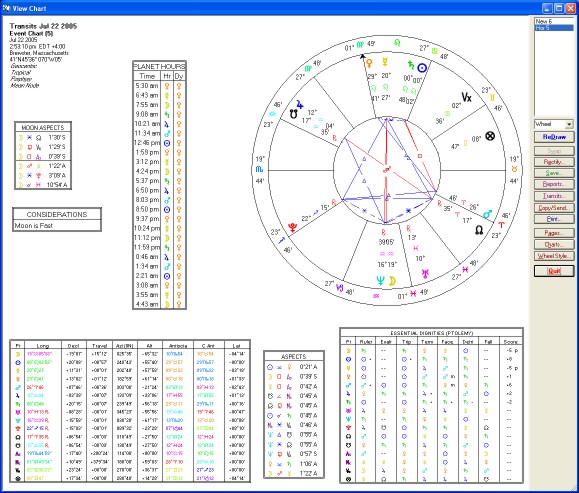
SF6 - New Planetary Hours Object Box
- New declination/latitude options include graphic declination and latitude strips in page designs; new Longitude Equivalent Declination charts (a Charles Jayne-inspired technique that converts the longitudes of every chart point to the longitude that the Sun would be in if it were at that declination); and (also as recommended by Charles Jayne) directions (as well as transits and progressions) in declination or latitude both in the dynamic hitlists and directed charts.
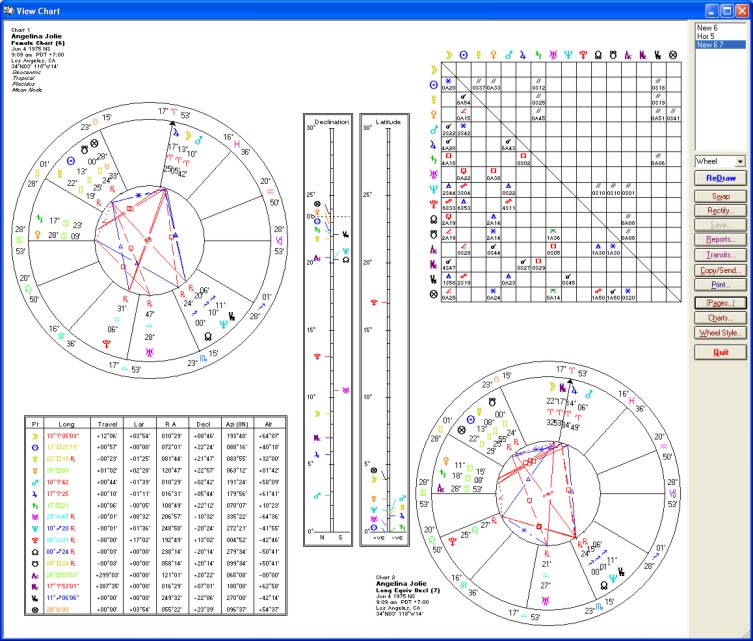
SF6 - New Declination Features
- New precision to the second of arc for all standard chart points is an option in tables and ephemerides. This precision is realistic, given Solar Fire’s state-of-the art Swiss Ephemeris accuracy.
- New direction options. Besides offering solar arc and other directions not just in the usual longitude but also in declination or latitude, the dynamic hitlists now include Van Dam primary directions (in addition to the existing mundane primaries). Also, both the hitlists and the directed charts now include solar arc and other directions in whole, half, double or reverse arcs.
- Improved Animated Chart has a fully functioning dial pointer. Also, it now lets you view pop-up interpretations, export calculated charts, and jump instantly to the regular chart screen.
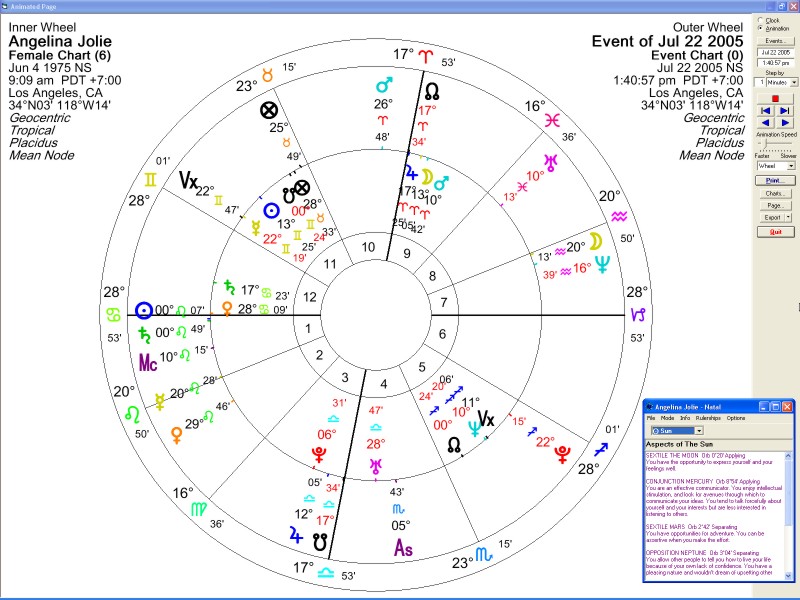
SF6 - Animation Screen with Interpretations
- Improved graphic ephemerides now have handy Forward and Back buttons that let you scroll through time as far as you wish without exiting from the graph screen. Also, you can now see a readout of the precise degree, date and time represented by the cursor’s position on the graph. And, just as you can do in the hitlists, you can now have graphic ephemerides showing half, double or reverse arc directions, and directed (as well as transiting and progressed) declinations. You can create graphic ephemerides in any modulus you wish, and if you want to insert the graph into a word processing or other document, you can right-click to send it to the clipboard or save it as a file.
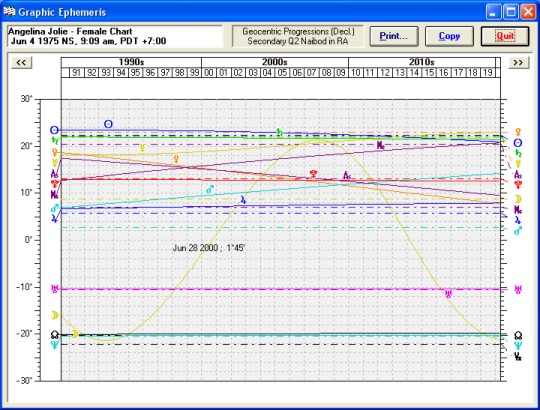
SF6 - Improved Graphic Ephemeris
- 1,000 Extra Asteroids. In addition to the 7 asteroids routinely included in all Solar Fire options, Solar Fire 6 now offers calculations for 1,000 extra asteroids from 5401 BC to 5399AD. These are from the state-of-the art Swiss Ephemeris, and estimated accuracy is to a few minutes of arc in 3000 BC. Besides bodies in the asteroid belt, these extra points include a dozen Centaur-class asteroids and the newly discovered Sedna and Quaoar. You can select any of these bodies to appear in extra-points wheel rings and tables for any chart. You can also include them in dynamic hitlists, time maps, graphic ephemerides and table-style ephemerides.
- New chart-file format enables you to attach an unlimited list of life events to any natal chart. It’s possible to use older Solar Fire charts -- and now even Nova-style charts -- directly in Solar Fire 6 without having to convert or import these charts. However, if you do want to attach life events, it’s very easy to convert charts to Solar Fire 6 format. For extra safety, Solar Fire 6 automatically places a backup copy of your old charts in an OldCharts folder.
- New precessed and converse transit charts (as well as progressed and directed) can now not only be calculated, but also saved to your files.
- New user-defined point order enables Solar Fire to list chart points in whatever order you prefer. Now you can begin every point list on the screen and in printouts with either the Sun or the Moon (or the Ascendant or any other point you wish).
- New “More” and “Apply” buttons let you input data for as many natal or subsidiary charts as you wish without exiting from the calculation window. A great time and keystroke saver!
- Easier than Ever to Upgrade. Solar Fire 6 can bring over not just your charts, but also your customized settings, from your previous version of Solar Fire.
What's New in Solar Fire 5?
Upgrading from version 4 to version 5:
- 5,000-year eclipse finder finds eclipses affecting any chart
- Animated chart wheel: put the natal in the middle, and up to 3 more rings of transiting, progressed, directed, etc. charts outside-click button, and watch the charts advance forward or back in time!
- Automated task wizard lets you record your choices, then play them back for any chart or group of charts
- Improved ephemeris generator now makes tables of transiting midpoints, extra asteroids, the transiting angles, Part of Fortune, and more.
- Built-in astro-mapping, local space, and eclipse path features
- Add your own points to the wheel: any Arabic parts, stars, eclipses, asteroids or degrees.
- State-of-the-art accuracy over 10,000 years
- Chart email button
- Synastry reports-in addition to natal and transiting
- Square charts for Ancient and Vedic work
- Lunar mansions, Arabic-style
- Dasa/bhukti tables
- Munkasey Midpoint Weighting Analysis
- Expanded ASCII data export: now you can export birth data, chart positions and all kinds of tabulations as text files that you can edit or drop into spreadsheets.
- Your choice of Uranus, Pluto and Capricorn glyphs.
- 32-bit programming that gives you all the benefits of Windows 95 and above, including long file names and faster operation. Ability to access charts on a network.
Return to Solar Fire v9 page
Order Solar Fire Gold V9
See our Order Form (pdf)
For more info or to order call:
1-800-THE-NOVA